For each customer with agreed rates or discounts, keep one agreed-rate sheet: each item, the agreed rate and discount as written in the customer's own order, letter or email, and the date the rates are valid from. Before an invoice to one of those customers goes out, check three things: every rate is the one on the sheet for the invoice date, the agreed discount is applied and only that one, and the quantity matches the signed delivery note. Keep a rate-change log so a new rate reaches billing on the day it starts.
Why agreed rates go wrong on invoices
Invoices are raised quickly from the item list, and the item list carries one price. A customer with an agreed rate list, a contract rate or a special discount needs a different price, and it changes when their agreement changes. So an old rate, the general price list or a forgotten discount goes out. If the invoice charges too much, the customer's accounts team usually spots it, holds the payment and asks for a corrected invoice. If it charges too little, nobody may notice, and the difference is simply not billed.
One agreed-rate sheet per customer
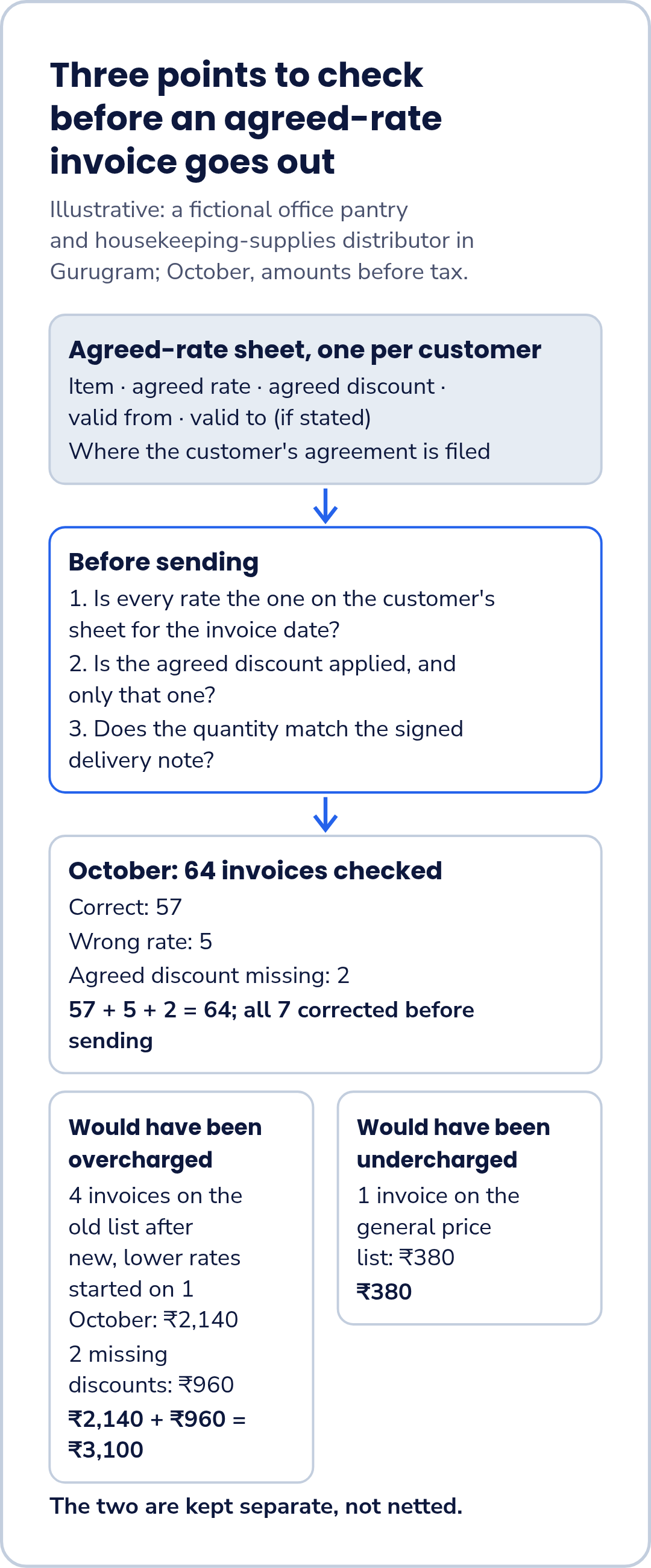
Keep the sheet with the customer's record. For each item:
- item;
- agreed rate;
- agreed discount;
- valid from;
- valid to, if the agreement states one;
- where the customer's agreement is filed.
Copy rates and discounts as written in the customer's own order, letter or email. If the wording is unclear, ask the customer before billing, not after.
The three-point check before sending
Only invoices to customers with an agreed-rate sheet need this check:
- Is every rate the one on the customer's sheet for the invoice date?
- Is the agreed discount applied, and only that one?
- Does the quantity match the signed delivery note?
If any answer is no, fix the invoice before it goes out.
Items not on the sheet
If an invoice to an agreed-rate customer includes an item that is not on their sheet, the owner or the sales person confirms the rate with the customer before the invoice is raised.
The rate-change log
When a customer agrees a new rate, write in the log the customer, the item, the old and new rate, and the date it starts, and update the customer's sheet the same day. Billing can check the log on a set day each week, or before each billing run, so no invoice goes out on a rate that has already changed. Decide in advance who approves a rate change.
The monthly look-back
Once a month, count the invoices checked, the invoices corrected before sending, and any invoices customers queried after they were sent. If an invoice has already gone out, ask your accountant how to correct it.
All amounts in this article are before tax.
Worked example: a pantry-supplies distributor in Gurugram
Illustrative example: a fictional office pantry and housekeeping-supplies distributor in Gurugram; October, amounts before tax. The business has 9 staff and supplies about 20 corporate offices, six of them on a yearly agreed rate list. All details are invented.
In October, 64 invoices to the six agreed-rate customers were checked before sending:
| Result of the check | Invoices |
|---|---|
| Correct | 57 |
| Wrong rate | 5 |
| Agreed discount missing | 2 |
| Checked | 64 |
57 + 5 + 2 = 64.
Of the 5 wrong-rate invoices, 4 used the old list after a customer's new, lower rates started on 1 October (charged higher by ₹2,140 in total) and 1 used the general price list (charged lower by ₹380).
The 2 missing discounts would have overcharged by ₹960.
All 7 were corrected before sending.
5 + 2 = 7.
Would have been overcharged: ₹2,140 + ₹960 = ₹3,100. Would have been undercharged: ₹380. The two are kept separate, not netted.
Templates
Agreed-rate sheet (one per customer):
Customer: ______ Where the customer's agreement is filed: ______
| Item | Agreed rate (₹) | Agreed discount (as written) | Valid from | Valid to (if stated) |
|---|---|---|---|---|
Rate-change log:
| Customer | Item | Old rate (₹) | New rate (₹) | Starts on | Source (order / letter / email) | Sheet updated on | By |
|---|---|---|---|---|---|---|---|
Talk through your books in a demo
If you would like to talk through how your business keeps its books, request a demo and choose "Book a demo" on the form. FastComply Books is in an invitation pilot in India, so the demo is where we confirm what is available for your business.