Give every customer and supplier one record with a fixed set of fields, and check the list for duplicates by comparing cleaned-up names alongside at least one other detail, such as GSTIN, phone or bank account. When two records turn out to be the same party, keep one, mark the other inactive and note what you did. Never delete a party that has transactions against it. Treat any change to a supplier's bank details as something to confirm separately before it is entered.
How the list gets messy
A party list grows one entry at a time. One person types "ABC Hardware", another types "M/s ABC Hardwares" from the letterhead, and a third types "ABC Hw" on a phone. Each becomes its own ledger. Payment terms agreed years ago stay on the record after they change. A supplier emails new bank details and someone updates the record without checking.
None of this stops the totals adding up. What it hides is what one party really owes you, or what you owe them: the balance is split across two or three ledgers, a reminder goes to an old contact, or a payment goes to an account nobody confirmed.
The minimum record
Agree the fields every customer and supplier record must have before it is used:
| Field | Customers | Suppliers | Notes |
|---|---|---|---|
| Name as on their own documents (invoice, order or letterhead) | ✓ | ✓ | One spelling, used everywhere |
| GSTIN, if they are GST-registered | ✓ | ✓ | Looked up before the record is used (see below) |
| Accounts contact: name, phone, email | ✓ | ✓ | The person who deals with bills and payments |
| Billing address | ✓ | ✓ | |
| Agreed payment terms | ✓ | ✓ | As actually agreed, not a default |
| Bank details | ✓ | Changes confirmed separately (see below) | |
| Date created, created by | ✓ | ✓ | |
| Last changed, changed by | ✓ | ✓ |
If a party is GST-registered, look up its GSTIN with the Search Taxpayer facility on the GST portal (gst.gov.in). It works without logging in and shows details such as the legal name, trade name and registration status, which you can compare with your record. If what you find does not match, or anything about it is unclear, ask your accountant before using the record.
The duplicate check
Export the customer list and the supplier list to a spreadsheet, and check each one separately.
- Add a cleaned-name column. Copy each name, then make it lower case and remove "M/s", "Pvt Ltd", "Private Limited", "Ltd", punctuation and spaces. "M/s ABC Hardwares" becomes "abchardwares".
- Sort by the cleaned name and read down the list, looking at neighbouring rows.
- Note near-misses as flags, not matches. Two names that differ only by a final "s", such as "abchardware" and "abchardwares", may be the same party. They may also be two different ones, such as a business called "Siddharth" and another called "Siddharths". Cleaning names makes different businesses look alike, which is why the next step needs a second detail.
- Compare the other fields for every flagged pair: GSTIN, phone and bank account.
Our own rule of thumb, not a standard: if the cleaned name and at least one other field match, the pair is probably a duplicate. If only the name matches, look closer before deciding. Either way, a person confirms each pair; nothing is merged because a spreadsheet matched it.
Merging without losing history
When a pair is confirmed as one party:
- Choose the record to keep, for example the one with the most complete and current details. Agree the choice with your accountant if both have transactions.
- Bring open items together using your software's own merge or deactivate feature, or as your accountant advises. Check how your current software merges or deactivates parties before you start.
- Mark the other record inactive so it cannot be selected for new entries. Do not delete it: its past invoices, bills and payments still point to it.
- Log the change: which record was kept, which was marked inactive, who confirmed it, and on what date.
Bank-detail changes
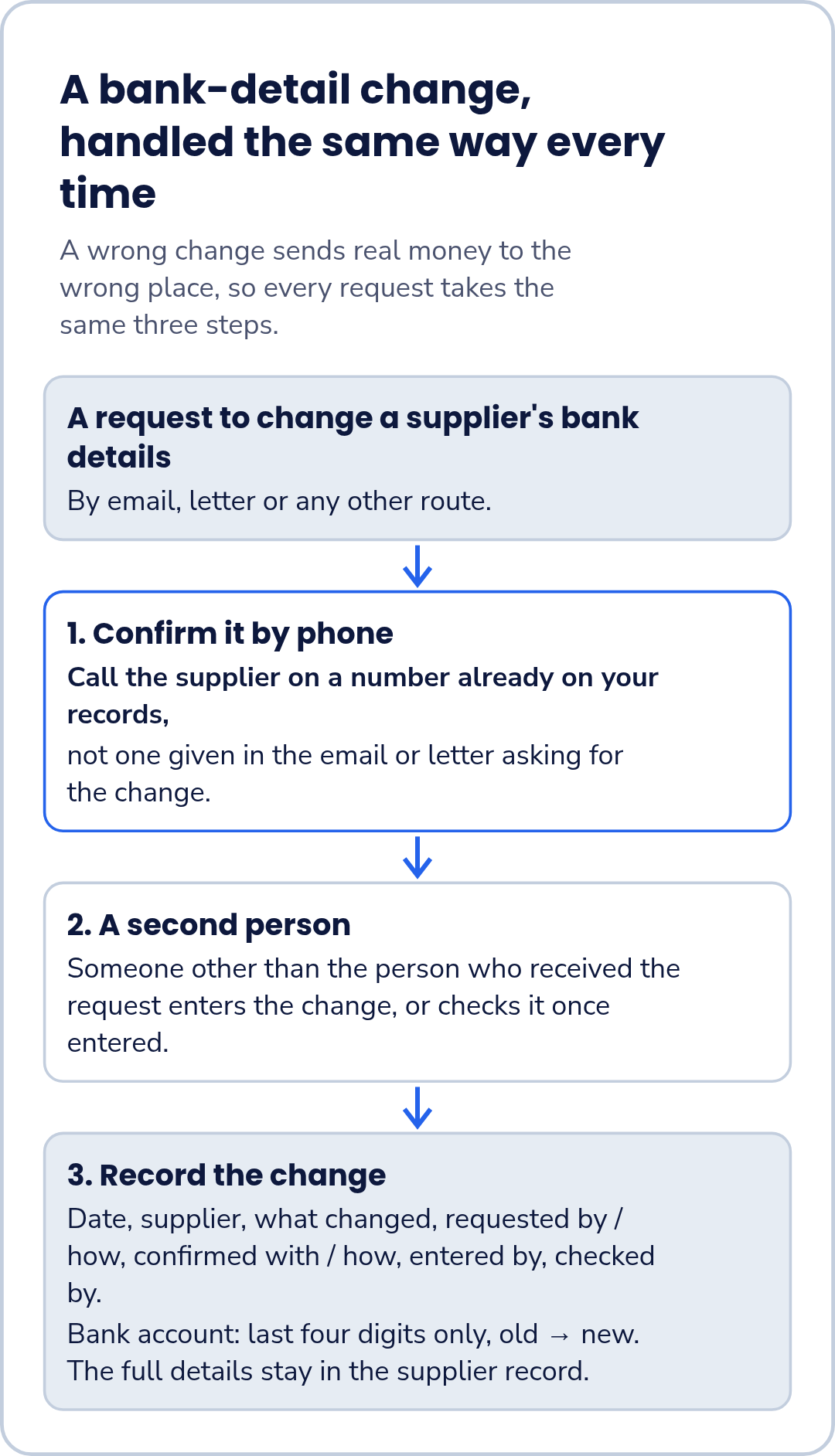
A supplier's bank details are the one field where a wrong change sends real money to the wrong place. Handle every change the same way:
- Confirm the request by calling the supplier on a number already on your records, not one given in the email or letter asking for the change.
- Have someone other than the person who received the request enter the change, or check it once entered.
- Record the change.
| Date | Supplier | What changed | Requested by / how | Confirmed with / how | Entered by | Checked by |
|---|---|---|---|---|---|---|
| Bank account (last four digits, old → new) |
Keeping only the last four digits in the log is a simple precaution: the log shows that the account changed without becoming another copy of full account numbers. The full details stay in the supplier record.
Worked example: a trading business in Salem
Illustrative example: a fictional light-trading business in Salem. No real business names or GSTINs are used.
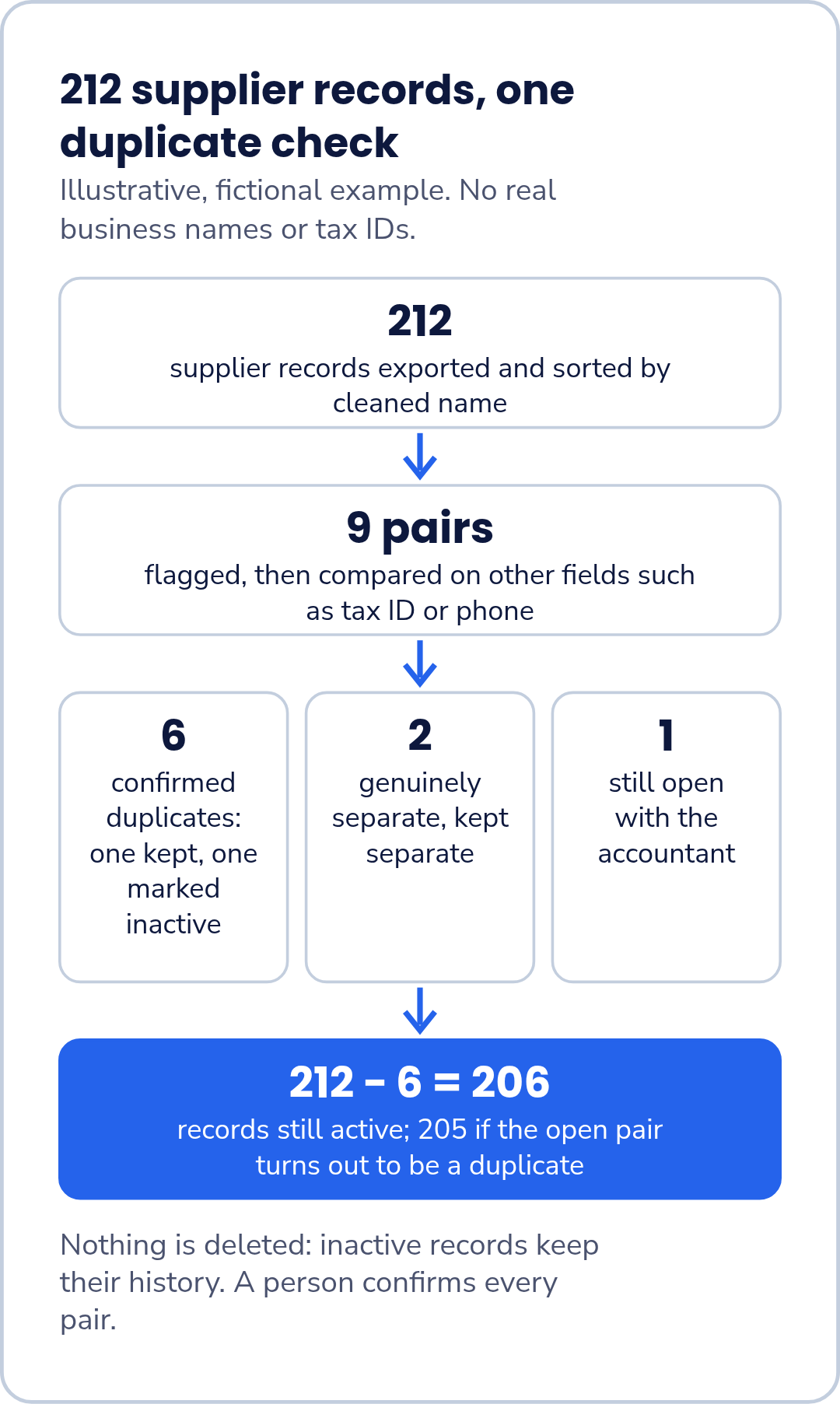
The business has 212 supplier records. The bookkeeper exports them, adds a cleaned-name column and sorts it. The check flags 9 pairs.
| Result after comparing other fields | Pairs |
|---|---|
| Confirmed duplicates: name plus GSTIN or phone match | 6 |
| Genuinely separate: the two records have different GSTINs, kept separate after checking with the accountant | 2 |
| Still open: left with the accountant to confirm | 1 |
| Flagged pairs | 9 |
For each of the 6 duplicates, the bookkeeper keeps one record, marks the other inactive and logs the change. Nothing is deleted.
Supplier records still active: 212 − 6 = 206. That figure includes both records of the 2 separate pairs and both records of the pair still being checked. Once the accountant replies on the open pair, the count either stays at 206 or drops to 205.
Keep it clean
- Complete every new record. Fill in every field in the minimum record before the record is first used.
- Have a second person review. New and changed records are reviewed by someone other than the person who created or changed them. Agree with your accountant how often, and follow the same steps each time.
- Repeat the duplicate check at the same review, on the records added since the last one.
- Leave inactive records inactive. If one is needed again, reactivate it and log the change rather than creating a new one.
Cleaning up before changing software?
If you would like to talk through how you keep customer and supplier records, and ask whether FastComply Books currently supports that routine for your business, including what could be brought across if you move, request a demo and choose "Onboarding & migration" or "Book a demo" on the form. FastComply Books is in an invitation pilot in India, so the demo is where we confirm what is available for your business.