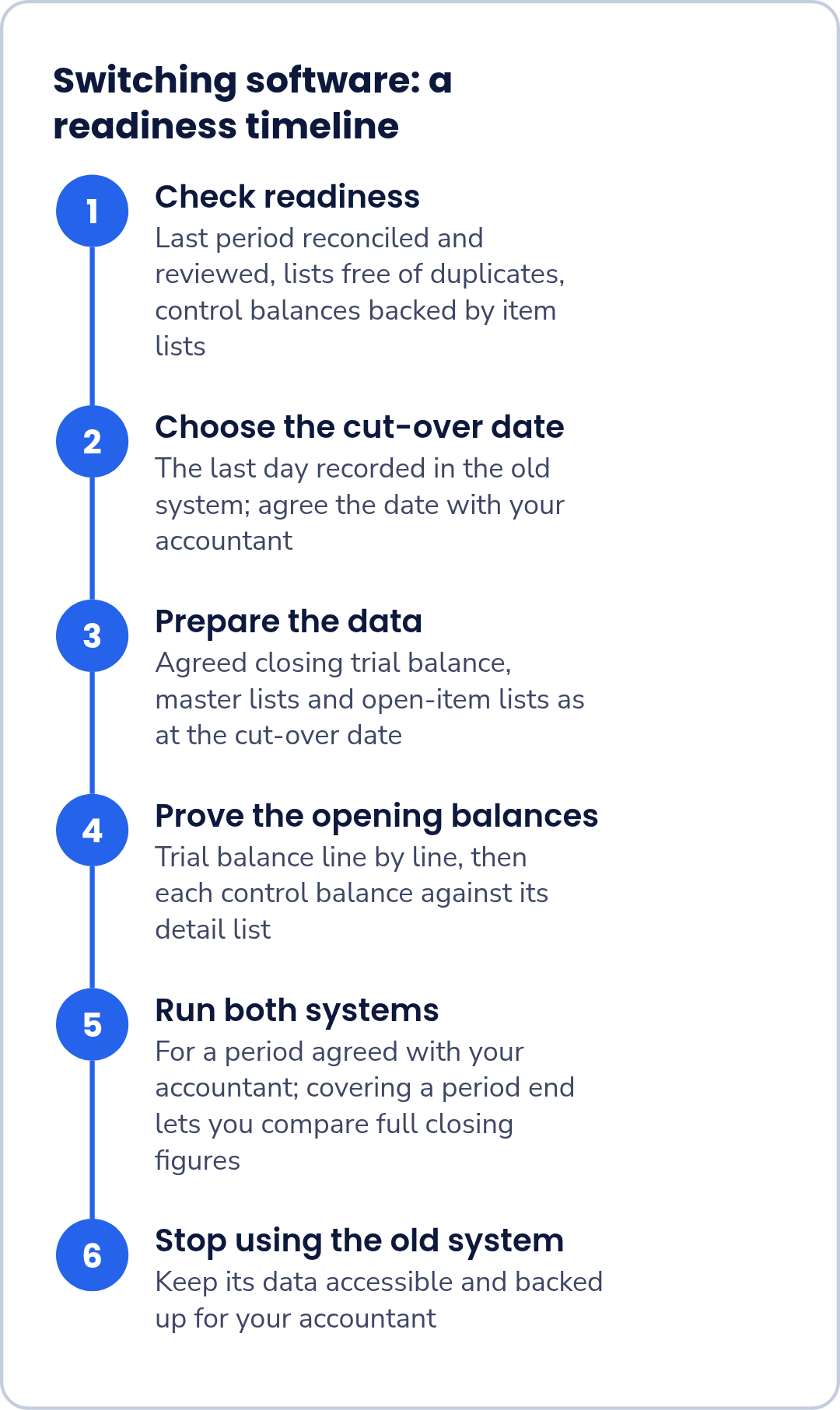
Before you move to new accounting software, three things should already be true: the last period's books are reconciled and reviewed by your accountant, your lists of customers, suppliers, items and ledgers are free of duplicates, and every control balance is backed by an item-by-item list. Then choose a cut-over date, check the new software's opening balances against the old trial balance line by line and against those item lists, and run both systems for an agreed period before you stop using the old one.
This checklist works whichever software you are leaving and whichever you are moving to. Run it with your accountant. Parts A to C below are worth doing even if you decide not to switch.
Two terms used below. A trial balance lists every ledger with its balance on a given date; total debits equal total credits. A control balance is a single figure in the trial balance, such as Debtors, that is made up of many individual items, such as unpaid customer invoices.
Is now the right time?
Switching is easier from a clean starting point. Consider waiting if any of these apply:
- The last month or quarter has not been reconciled or reviewed.
- Your accountant has not agreed the plan or the date.
- You are partway through a period with many open items and no pressing reason to move now.
- Nobody can spare the time to record transactions in both systems for a while.
The readiness scorecard
Mark each line Yes or No. Every No needs an owner and a fix before the cut-over date.
| Part | Check | Ready? | Who fixes it |
|---|---|---|---|
| A. Clean books | Every bank account reconciled up to the last period end | ||
| Last period reviewed by your accountant | |||
| Suspense or unexplained entries cleared, or listed with an explanation | |||
| B. Clean masters | Customer list has no duplicates (the same customer under two spellings, for example) | ||
| Supplier list has no duplicates | |||
| Item list cleaned, if you track stock | |||
| Ledger list reviewed: unused or duplicate ledgers marked | |||
| C. Open items | Unpaid customer invoices listed invoice by invoice, and the list total equals Debtors | ||
| Unpaid supplier bills listed bill by bill, and the list total equals Creditors | |||
| Advances received from customers and paid to suppliers listed | |||
| If you hold stock: quantities listed item by item, with the values shown in your closing records | |||
| Loan balances agreed with the lender's statements |
Part C rests on one rule that matters at every later step: each control balance must equal the total of its detail list. If Debtors in the trial balance does not equal the sum of the unpaid invoices, fix that in the old system first; a mismatch moved to new software is harder to trace. For stock, list what your closing records show and leave any question about how stock is valued to your accountant.
Choose the cut-over date
The cut-over date is the last day recorded in the old system. The new system starts the next day, and its opening balances are the old system's closing balances on the cut-over date.
- A month-end or quarter-end can give you a reconciled, reviewed closing trial balance to start from, if that period has been closed properly.
- A year-end keeps a whole year in one system, which can make comparisons and reviews simpler.
- A date in the middle of a period means more open items to bring across and more checking.
These are practical trade-offs, not rules. Agree the date with your accountant, who can tell you whether anything specific to your business affects the choice.
Prepare the data
Check your current software's export options, and gather these as at the cut-over date:
- The closing trial balance your accountant has agreed as the starting point.
- Master lists: customers, suppliers, items and ledgers.
- Open-item lists: unpaid invoices, unpaid bills, advances, and stock if relevant.
Put the cut-over date in each file name, and ask your accountant to confirm the exported balances. If anyone changes an entry in the old period after you export, export again and repeat the checks; otherwise you will be proving the new system against figures that no longer exist.
Prove the opening balances
Do two checks before anyone records a new transaction in the new software.
- Trial balance, line by line. For every ledger, the opening balance in the new software must equal the balance in the agreed starting trial balance, and total debits must equal total credits. If you cut over at a year-end, ask your accountant which version of the closing trial balance to use as the starting point, and use only the version they have confirmed.
- Each control balance against its detail. Debtors must equal the total of the open invoices brought across, Creditors the total of the open bills, and so on.
The first check proves the totals; only the second proves the detail behind them, as the example shows.
Worked example: a missing invoice found before go-live
Illustrative example: a fictional business with invented figures.
A business closes its old books at a month-end. The old trial balance shows Debtors of ₹4,35,000, made up of six unpaid invoices. In the new software, the Debtors opening balance was entered as a total and reads ₹4,35,000, so the line-by-line trial balance check passes. The unpaid invoices were brought across separately as a list, and that list tells a different story:
| Invoice | Customer | Amount (₹) | In old list? | In new list? |
|---|---|---|---|---|
| INV-A | Customer 1 | 1,20,000 | Yes | Yes |
| INV-B | Customer 2 | 95,000 | Yes | Yes |
| INV-C | Customer 3 | 80,000 | Yes | Yes |
| INV-D | Customer 4 | 65,000 | Yes | Yes |
| INV-E | Customer 5 | 45,000 | Yes | Yes |
| INV-F | Customer 6 | 30,000 | Yes | No |
| Total | 4,35,000 (6 invoices) | 4,05,000 (5 invoices) |
The new invoice list totals ₹4,05,000, ₹30,000 short of Debtors. Comparing the two lists invoice by invoice shows INV-F is missing; it is also the only ₹30,000 invoice, which confirms the gap. Once INV-F is added, the list totals ₹4,35,000 and agrees with Debtors.
Had the gap gone unnoticed, the totals would still have looked right, but Customer 6 would have shown nothing owed: no reminder would go out, and when the ₹30,000 arrived there would be no invoice to apply it to.
Run both systems, then stop
Record transactions in both the old and the new software for a period you agree with your accountant. Covering at least one period end lets you compare a full set of closing figures: the trial balance, the Debtors and Creditors lists and each bank balance. Every difference should have an explanation before you rely on the new system alone.
Then stop entering transactions in the old system. Before you cancel it, make sure you can still open or export its data, and keep a backup your accountant can access. Ask your accountant how long the old system's data must be kept, and in what form.
Questions to ask any software provider
Ask these of every option you are considering, and get the answers in writing:
- Which versions and files from my current software can you take?
- What exactly comes across: masters, opening balances, open invoices and bills, stock, or past transactions?
- Can we try the transfer on a copy before the real cut-over?
- Who checks the opening trial balance against my old one, and how?
- How are control balances checked against the open-item lists?
- If the opening balances do not match, what happens? Can we start again?
- What do I need to have ready, and who does which part of the work?
Considering FastComply Books for your move?
Bring your scorecard and the questions above to a demo. Ask exactly which data, if any, can be brought across today and how the opening balances would be checked, so you and your accountant can decide on timing. Request a demo and choose "Onboarding & migration" on the form, or "Book a demo" if your question is broader. FastComply Books is in an invitation pilot in India, and what is available for your business is confirmed in the demo.