Keep one register of the equipment, furniture and vehicles your business owns. Fill in a row on the day you buy something: what it is, its serial number, the supplier's bill, where it is kept and who looks after it. Tag the item and file the bill under the same ID. Walk round with the register now and then to check that everything is still there, and when something is sold, scrapped or lost, mark it on the register instead of deleting it. Your accountant keeps the depreciation schedule; this register is the list they build it from.
The register
One row per item, or one row for a set of identical items bought on the same bill. These core columns are the ones you use on the walk-round:
| Asset ID | Description | Bill no. and date | Bill amount (₹) | Location | Status | Last seen on |
|---|---|---|---|---|---|---|
Keep these fields for each row too, as extra columns in a spreadsheet or on a second sheet listed by Asset ID:
- make, model and serial number
- supplier
- date put to use
- person responsible
- warranty end date
- insurance reference
- disposal: date, how it left, any amount received, who confirmed it
Bill amount is the figure printed on the supplier's bill. What counts as an asset, what its cost is and how it is depreciated are for your accountant to decide; the register deliberately has no depreciation columns.
Status is one of: in use, in storage, under repair, disposed.
Your register and your accountant's schedule
Your accountant's depreciation schedule can only include what they have been told about. If nobody records the serial number, where an item is, which bill it came from or the day it was scrapped, the schedule keeps things that are gone and misses things that arrived. The register is the source; the schedule is the calculation.
What to record on the day you buy
Fill in the row when the item arrives, while the bill and the delivery are in front of you:
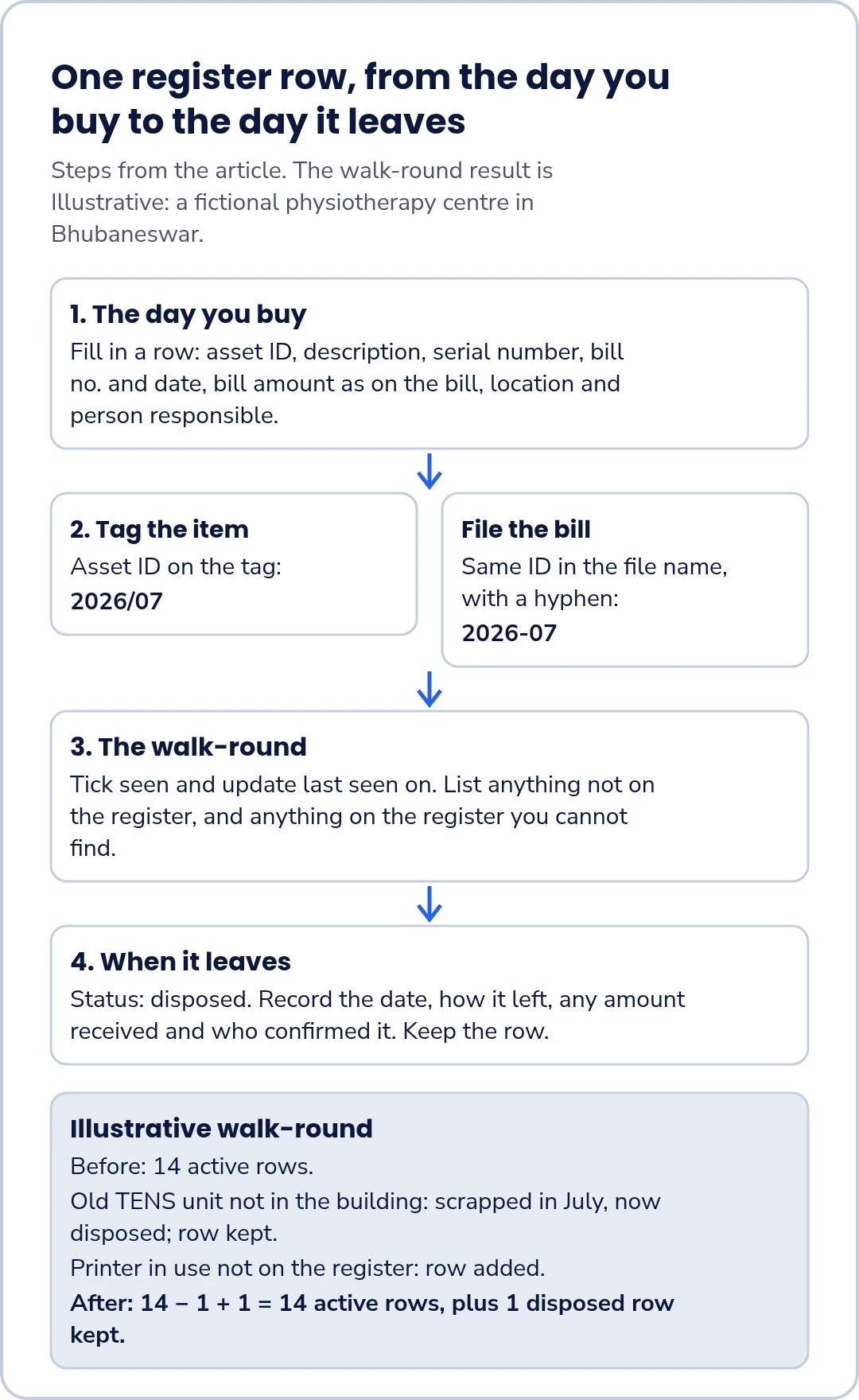
- Asset ID: your asset ID (a plain running number with the year of purchase, e.g. 2026/07, written on the tag; in the bill's file name write it with a hyphen, 2026-07, because file names can't contain '/').
- Description, make, model and serial number: enough to tell it apart from a similar item.
- Supplier, bill number and bill date.
- Bill amount, as on the bill.
- Date put to use, which may differ from the bill date.
- Location and person responsible.
- Warranty end date and insurance reference, if any.
Tag the item, file the bill
Stick the asset ID, such as 2026/07, on the item where it can be seen. File the bill and warranty card under the same ID, written 2026-07 in the file name, so anyone can go from the item to its paperwork and back.
The walk-round
Every so often, walk the premises with the register. Twice a year is one suggested habit; choose what suits your business. For each row:
- tick seen, and update last seen on;
- note the condition and the current location;
- list anything you find that is not on the register;
- list anything on the register that you cannot find.
Then follow up each item on the two lists: find the bill for anything missing from the register, and find out what happened to anything you could not see.
When something leaves
When an item is sold, scrapped, lost or given away, record:
- the date;
- how it left: sold, scrapped, lost or given away;
- any amount received;
- who confirmed it.
Change the status to disposed and keep the row. Deleting it would remove the history your accountant needs. How a disposal is treated in the accounts, and any tax effect, is for your accountant.
What to send your accountant
Send the register, the bills for anything bought since you last sent it, and the list of disposals, once a year or whenever your accountant asks.
Worked example: a physiotherapy centre in Bhubaneswar
Illustrative example: a fictional physiotherapy centre in Bhubaneswar, with nine staff and two treatment rooms. All details and amounts are invented.
Bought this year. The centre adds three purchases to its register:
| Item | Bill amount |
|---|---|
| Ultrasound therapy unit | ₹1,85,000 |
| Two treatment tables at ₹38,000 each (one row, one bill) | ₹76,000 |
| Front-desk laptop | ₹62,000 |
| Total of bills entered | ₹3,23,000 |
2 × ₹38,000 = ₹76,000, and ₹1,85,000 + ₹76,000 + ₹62,000 = ₹3,23,000. That total is the bills entered, not a cost or value.
The walk-round. Before it, the register has 14 active rows, including the three rows for this year's purchases (the two tables share one row). The office manager walks both treatment rooms and the front desk with it and finds two things:
- An old TENS unit is on the register but not in the building. The owner confirms it was scrapped in July; nobody had noted it. The row is updated: disposed (scrapped) in July, no amount received, confirmed scrapped by the owner on the day of the walk-round.
- A printer in use is not on the register. The office manager finds its bill and adds a row with the next asset ID for the year it was bought.
After the walk-round: 14 − 1 + 1 = 14 active rows, plus 1 disposed row kept on the register.
The register, the three new bills and the note on the TENS unit go to the accountant.
Discuss your asset register in a demo
If you would like to talk through how you record equipment the business buys, and ask whether FastComply Books currently supports that routine for your business, request a demo and choose "Book a demo" on the form. FastComply Books is in an invitation pilot in India, so the demo is where we confirm what is available for your business.