If your business has two or three premises, put every electricity, water, phone and internet connection on one list, by connection or account number. When the bills come in, compare each one with the same connection's own last three months, against a "noticeably different" line you set yourself. For any bill outside that line, check three things: whether the reading was estimated or differs from your own meter reading, whether anything changed at that premises, and whether the connection is still needed. Then ask the provider about anything still unexplained, with your readings in hand.
Why small bills go unchecked
Each premises has its own meter, water connection, phone and internet line. The bills arrive on different dates, are paid online, and each is small enough to pass without a second look. So a bill on an estimated reading, a meter running high or a line that should have been closed months ago can run on unnoticed.
One list of every connection
Make one list for all premises. For each connection:
- premises;
- type: electricity, water, phone or internet;
- provider;
- connection, consumer or account number, as printed on the bill;
- whose name the connection is in;
- deposit paid, if any;
- still needed: yes or no, with a note of why.
Collect the connection numbers from the latest bill for each line, and from the provider's portal or app for lines whose bills go to someone's email. A connection you cannot find a bill for is worth noting too.
The monthly sheet
One row per connection, each time its bill arrives. Most of these bills come monthly; for a connection billed less often, add a row each billing period.
- usage as printed on the bill (units, kilolitres or data), where the bill shows any;
- amount, as printed;
- whether the bill says the reading was estimated;
- average of the last three bills;
- same period last year, if you have it;
- your own meter reading, where you can read the meter;
- flag.
Taking your own reading. Read the meter at the start and at the end of each billing period; your bills show the dates each period covers. Write down the date, the reading and who took it, and take a dated photo of the meter. The units used are the end reading minus the start reading.
Your own "noticeably different" line
Write at the top of the sheet the difference you would want to know about, for example a number of units or a rupee amount for each type of connection. This page gives no threshold; the line is yours. Any bill that differs from the connection's three-month average by more than your line gets a flag. So does any bill for a connection your list marks as not needed, even if the amount looks normal.
Three checks for a flagged bill
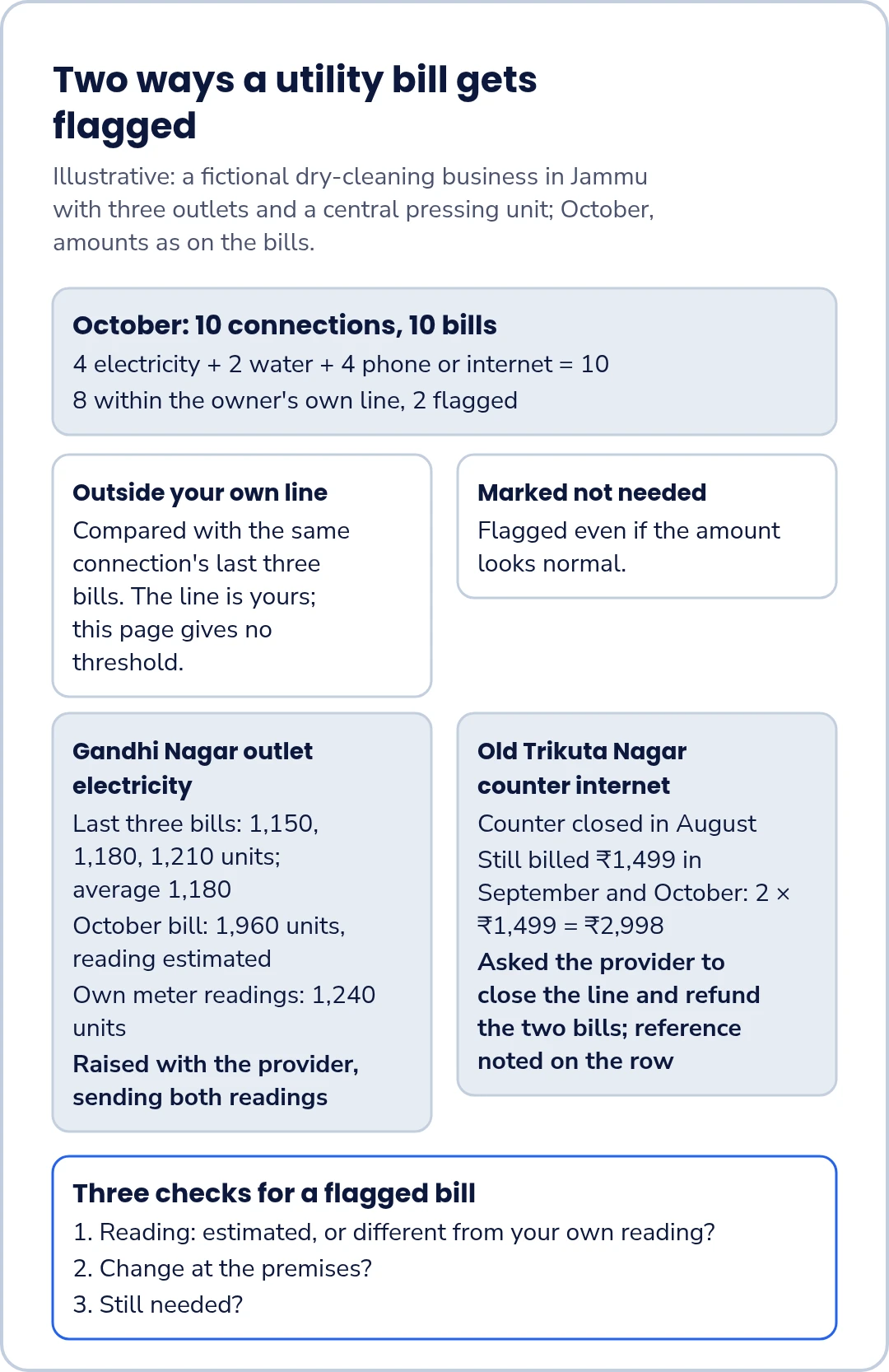
- Reading: does the bill say the reading was estimated, or do its units differ from your own reading? If a bill is marked estimated, ask your provider about it.
- Change at the premises: longer hours, a new machine, a leak, a new phone plan, more staff on site?
- Still needed? Is the line or connection still in use at all?
Still needed does not mean "used this month". A backup internet line, a connection at a premises that is open only part of the year, or a phone line kept for a number customers know may show little or no use and still be needed. Before you close anything, ask whoever relies on it.
Asking the provider
For anything the three checks do not explain, contact the provider through its own process. Send:
- the connection or account number and the bill period;
- the bill amount and usage as printed;
- your own start and end readings, with dates and photos;
- for a line that should be closed, the date you asked for it to be closed and any reference you were given.
Write the date and the complaint or reference number on the row. How a bill is worked out and how to dispute it is your provider's to explain.
A phone or internet plan paid once a year belongs on your renewals list.
Worked example: a dry-cleaning business in Jammu
Illustrative example: a fictional dry-cleaning business in Jammu with three outlets and a central pressing unit; October, amounts as on the bills. The business has about 16 staff. Locality names are used generically. All details are invented.
The connection list has 10 connections: 4 electricity, 2 water and 4 phone or internet.
4 + 2 + 4 = 10.
In October, 8 bills are within the owner's line and 2 are flagged.
8 + 2 = 10.
Gandhi Nagar outlet electricity. The last three bills were for 1,150, 1,180 and 1,210 units, an average of 1,180 units.
(1,150 + 1,180 + 1,210) ÷ 3 = 3,540 ÷ 3 = 1,180.
The October bill is for 1,960 units and says the reading was estimated. The outlet's own meter readings at the start and end of the same billing period showed 1,240 units used.
The owner raises the bill with the provider, sending both readings.
Old Trikuta Nagar collection counter internet line. The counter closed in August, but the internet line was still billed ₹1,499 in September and again in October. The amount was the same as always, so it was not outside the owner's line; it was flagged because the connection list marks the line as no longer needed.
2 × ₹1,499 = ₹2,998.
The owner asks the provider, through its own process, to close the line and refund the two bills, and notes the reference on the row.
Templates
Connection list:
| Premises | Type | Provider | Connection / account no. | In whose name | Deposit paid (₹) | Still needed (yes / no, why) |
|---|---|---|---|---|---|---|
Monthly sheet:
"Noticeably different" line: ______
| Connection / account no. | Bill period | Usage as printed | Amount (₹) | 3-bill average | Flag |
|---|---|---|---|---|---|
For each row, also note whether the bill says the reading was estimated, the same period last year, your own reading (start, end, units) and the date and reference if you raised it, as extra columns or on a second sheet.
Keeping an eye on every connection?
If you would like to hear about FastComply Books for your business, you can request early access. FastComply Books is in an invitation pilot in India and public sign-up is not open yet.