Give every supplier bill and expense receipt one way in, one file name and one line in a register. Each line records where the bill is in its life (received, entered, approved, paid) and which payment settled it. At month end, two checks on the register show which payments have no bill and which bills have been entered twice. A spreadsheet is enough.
Why a folder alone is not enough
Bills reach a small business from several directions: email, WhatsApp, a courier envelope, a staff member's pocket. Payments leave by bank transfer, UPI and card. A folder answers one question: do we have the file? It cannot tell you whether the bill has been entered, approved or paid, or which bank, UPI or card line paid it.
That is where both problems start. A bill entered from the supplier's email and again from the bank line looks like two purchases. A UPI payment made at a counter, with the bill left behind, looks like a purchase with nothing to support it. Neither shows up in a folder; both show up in a register.
Step 1: one intake point and one naming rule
Pick a single place where every bill lands before anyone does anything with it: a shared email address, or one shared folder with a subfolder for each month. Anyone who receives a bill another way forwards it there, or uploads a photo of it, the same day if they can.
One person then renames the file, adds it to the register and updates its status. Everyone else only has to drop bills in one place; they do not need to learn the naming rule.
Naming rule: bill date_supplier_bill number_amount
- Use the date printed on the bill, written year-month-day, so files sort in date order.
- Replace
/and other unusual characters in bill numbers with-. - Write the amount without ₹ or commas.
For example, a bill numbered INV/D/017 dated 4 October from a fictional Supplier D for ₹27,000 becomes YYYY-10-04_SupplierD_INV-D-017_27000.pdf, with YYYY replaced by the year on the bill, spaces removed from the supplier name and / replaced by -.
Step 2: the bill register
Keep one sheet with one row per bill, and add rows through the month.
| Column | What goes in it |
|---|---|
| Received on | The date the bill reached the intake point |
| Supplier | The supplier's name, written the same way every time |
| Bill no. | Exactly as printed on the bill |
| Amount (₹) | The bill total |
| Source | Where the row came from: email, WhatsApp, courier, staff, or a bank, UPI or card line |
| Status | Received → Entered → Approved → Paid |
| Payment ref | Bank reference, UPI transaction ID or card statement line |
| File name | The renamed file; blank if you do not have the bill yet |
| Notes | Anything unusual, and any flag from the checks |
The status and file name columns are what a folder lacks:
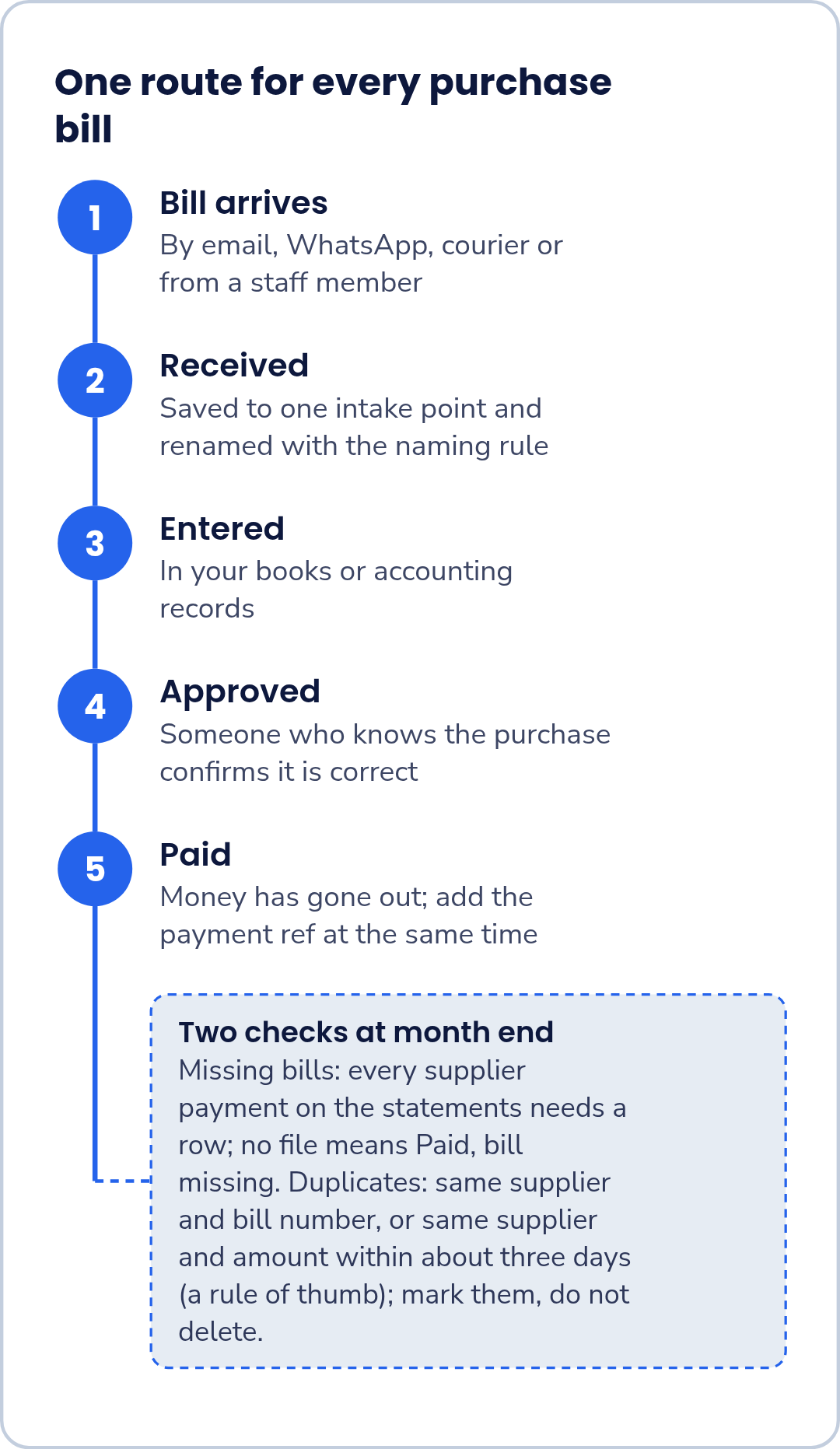
- Received: the bill is at the intake point and renamed.
- Entered: it is in your books or accounting records.
- Approved: someone who knows the purchase has confirmed it is correct.
- Paid: money has gone out. Add the payment ref at the same time.
A row that sits at Approved for weeks is a bill waiting to be paid. A row at Paid with a blank file name is a payment waiting for its bill.
What a bank line does not tell you
A bank, UPI or card line usually shows the date, the amount and a short narration. It does not show what was bought, which period it relates to, or the tax details printed on the supplier's bill. Those come from the bill itself, which is why each payment needs its bill linked in the register. Your accountant can confirm which GST details and documents you need for your situation.
Step 3: two checks at month end
Missing bills. Go through the month's bank, UPI and card statements line by line. For every payment to a supplier, find its row in the register. If there is no row, add one from the statement line. If the row has no file name, mark it Paid, bill missing and ask the supplier for a copy.
Duplicates. Sort the register by supplier, then by amount, and look for pairs that match either test:
- same supplier and same bill number; or
- same supplier and same amount within about three days of each other.
The three-day test is our own rule of thumb, not a standard; it only tells you where to look. A flagged pair can be genuine, such as two identical deliveries in one week, so open both bills before deciding. When a row is a duplicate, mark it as one in Notes rather than deleting it, so the register shows what happened. If the duplicate was already entered in your books, tell your accountant so the entry can be corrected.
Worked example: a trading business in Coimbatore
Illustrative example: a fictional light-trading business in Coimbatore. Supplier names, bill numbers and amounts are invented.
The business made five purchases in October, one from each of five suppliers. At month end, the register had six rows.
| # | Supplier | Bill no. | Amount (₹) | Source | Status | Payment ref | File name | Notes |
|---|---|---|---|---|---|---|---|---|
| 1 | Supplier A | 0412 | 62,000 | Paid | Bank transfer | On file | ||
| 2 | Supplier B | B-2291 | 48,500 | Courier | Paid | Bank transfer | On file | |
| 3 | Supplier C | 117 | 31,800 | Paid | Card | On file | ||
| 4 | Supplier D | INV/D/017 | 27,000 | Paid | Bank transfer | On file | ||
| 5 | Supplier D | INV/D/017 | 27,000 | Bank line | Entered | Bank transfer | Duplicate of row 4; already entered in the books | |
| 6 | Supplier E | (none) | 15,000 | UPI line | Paid, bill missing | UPI | Copy requested from supplier |
The duplicate. Supplier D's bill was entered once from the email and again a few days later from the bank line, whose narration carried the bill number. Same supplier and same bill number flagged the pair. The bookkeeper opened the one bill on file, confirmed there was only one purchase, marked row 5 as a duplicate and told the accountant, because row 5 had already been entered in the books.
The missing bill. The ₹15,000 UPI payment to Supplier E was a real purchase, but no bill came with it. Row 6 was added from the UPI statement line and stays at Paid, bill missing while the bookkeeper asks Supplier E for a copy.
| Set | Rows | Total (₹) |
|---|---|---|
| Register as found, duplicate included (rows 1–6) | 6 | 2,11,300 |
| Purchases, duplicate excluded (rows 1–4 and 6) | 5 | 1,84,300 |
| Bills on file (rows 1–4) | 4 | 1,69,300 |
| Paid, bill missing (row 6) | 1 | 15,000 |
The duplicate overstated purchases by ₹27,000 (₹2,11,300 − ₹1,84,300). Of the ₹1,84,300 actually paid, ₹1,69,300 is backed by bills on file and the remaining ₹15,000 is listed as waiting for one, so every rupee is accounted for.
Staff receipts
Treat a staff member's receipts like any supplier bill: same intake point, same naming rule, one register row each. Write the staff member's name in Notes and use the reimbursement payment as the payment ref. If a claim has been reimbursed without a receipt, mark it Paid, bill missing and ask your accountant what to do if the receipt cannot be found.
Take it to your accountant
Send the month's register with the renamed files, and point out anything still flagged: payments waiting for a bill, duplicates already entered in the books, pairs you were unsure about and bills not yet approved. Ask your accountant which GST details your bills should show for your situation and how long you need to keep bills and payment records, and agree whether the register needs any extra columns for them. Claiming GST input tax credit and matching bills against GSTR-2B are outside the scope of this routine; raise them with your accountant.
Discuss your bill routine in a demo
If you would like to talk through how your business receives and pays bills, and ask whether FastComply Books currently supports that routine for your business, request a demo and choose "Book a demo" on the form. FastComply Books is in an invitation pilot in India, so the demo is where we confirm what is available for your business.